Posts

OMAPZoom tutorial hour!!

So omapzoom folks have a tutorial hour now, some really cool topics get caught up here.. this week: · Android on OMAP Overview and Resources · DSP Bridge Overview · OpenEmbedded Overview it is a webex (works on most OSes including a linux PC) + teleconf -> large number of access numbers from around the world more information here . the OMAP tutorial hour (including the previous presentations - which by the way explains kernel process from TI) are available here .

Smart Reflex what is it?

Image
Googling around, I found this beautiful article that gives excellent explanation of how Adaptive Voltage behaves in the system. by the way, this is going to be part of my rewrite of smart reflex driver to make the voltage infrastructure a lot more cleaner and easy to use. General flow I am thinking is as follows(will change ofcourse): voltage driver |------------> No SR PMICs implementation thru regulator framework perhaps. \-------> Smart reflex driver |----> PMIC interface (for class 0 devices) |-----------------------------------\ \-----> Voltage processor driver -> Voltage controller driver Ofcourse things might change as I move on with the implementation (I need to think a little more on this), but once I am done, you should be able to see it here

few new things I see on linux-omap kernel community

After a long while of staying off linux-omap, been watching it rather closely recently.. here are some interesting stuff I saw this month: Power Management: Operating points and general PM strategy for handling for various silicons here Silicon Feature support for OMAP3 here New silicon support: OMAP35xx and 36xx support being introduced. Discussion on memory and cache issue here ETM, ETM support here few new PMIC - 6030 and 5031 hints of wl1251 support getting upstream IO_ADDRESS is dead use io_remap like the rest of the world spring cleaning of omap850/730 series and of course a bunch of stuff I have missed posting here such as move to 2.6.32-rc4 by Tony and Kevin, both pushing out patches to mainline etc.....

some interesting posts

High time I "ported" my posts from facebook back here.. so here it goes Some really bad code stories: shared by rob clark - how bad can some code go?? http://thedailywtf.com/Articles/The-Shenanigans-Handler.aspx Aint this cool: http://arstechnica.com/web/news/2009/09/horrifically-bad-software-demos-become-performance-art.ars Techno Curios: Tired of fullspeed, highspeed, lowspeed?? how about superspeed?? tired of acronymns already?? http://www.pcworld.com/article/172757/wheres_usb_30.html Search for my cheap oscilloscope goes on: http://www.micahcarrick.com/06-06-2006/pc-sound-card-oscilloscope-linux.html http://www.fpga4fun.com/digitalscope.html Hacks 'nd bytes: PS3 back with Hulu.. http://www.ypass.net/blog/2009/06/got-a-ps3-want-hulu-back-easy-enough/

timing diagrams

Image
drawtime This is kinda a cool app that runs on ubuntu to draw timing diagrams as follows: Example(from the drawtime website): CS1 = 1, OE = 1, ADDR = X, DATA = Z. CS1 = 0, OE = 0, ADDR = "". OE -tOE> DATA = ""; CS1 -tCS1> DATA; ADDR -tACC> DATA. OE = 1, CS1 = 1, ADDR = X. CS1 -tH> DATA = Z; OE -tH> DATA; ADDR -tH> DATA. and you can now generate all those cool waveforms without having to worry about did you get the lines right etc.. more such cool stuff here

Flashlite and Valgrind for OMAP3!!

Image
Looking through the beagleboard facebook group , Saw two interesting points: Flash Lite 3.1 evaluation version for Beagleboard For all the Beagleboard fans out there, we’ve created an evaluation version of Flash Lite 3. This is a fully functional version of Flash Lite that times out in 3 minutes. It is built on Angstrom Linux distribution and requires X. Please email me if you are looking for more information or are interested in having one. I should mention that OMAP 3530 (ARM Cortex A8) is a powerful CPU and seems to handle graphics as well as video very well." How to build Valgrind for Beagleboard 1) Get Valgrind source code from SVN using revision 9648 and 1888 for VEX svn co -r 9648 svn://svn.valgrind.org/val grind/trunk cd VEX svn update -r 1888 2) Download the patch here http://bugsfiles.kde.org/a ttachment.cgi?id=32348 3) Apply the patch into the source code cd valgrind patch -p1 4) Run autogen.sh to run autotools 5) Configure the source code ./configure --host=arm-angst...

CELF 2009 - France (ELC-Embedded Linux Conference)

here are the sessions in the conference: http://www.embeddedlinuxconference.com/elc_europe09/sessions.html Includes Sascha and my personal fav - u-boot v2 .

And then Finally TI U-Boot tree!!

Finally.... here it is!!! patches for u-boot to be send straight to u-boot mailing list .

Free DSP codecs!!!

Wow.. a blast of new sites for omapzoom.. And then I see this on the new omapzoom google groups !!! * MPEG4 Video Dec * H263 Video Dec * JPEG Dec * JPEG Enc * AAC Dec https://gforge.ti.com/gf/project/openmax/frs/?action=index And you also now have a wiki for omap

Plato! trace-visualize-debug-filter code path!

Got this link from a colleague - kinda useful if you would like to use it for your own purposes.. quote from the site: PLATO is a tool for displaying and analyzing software traces from an application being debugged. It connects to TTIF (libttif.so, included) which provides a lower overhead replacement for printf(), so as to minimize the chance that timing related bugs disappear when you enable debug traces, and also some binary trace APIs. PLATO can be running on a separate PC from the application being debugged, making it suited for embedded development. PLATO will decode/filter/display/visualize the traces

towards a integrated infrastructure for feature + errata handling in kernel

I have a confession to make: I am fanatic about clean code. I like it simple and I like it elegant. Few days back, I had a chat on linux omap mailing list on what I'd dream to see instead of a half a dozen cpu_has_feature_XYZ() APIs in the system.. The thought is more of this form: Some sort of infrastructure which is common to all silicons,platforms exist which provides method to register the tuple (silicon_rev_id | ip_module_rev_id, feature_errata_id) Specific drivers such as DMA, I2C, McBSP, PRCM etc.. on registration provides to the system the an array of tuples for that device. Platform on bootup provides the platform_data to the driver, which allows the driver to start, but now, it can also detect cpu_rev and can grap it's own IP Module rev from it's own register.. -> that is provided to the infrastructure Every time there is a need to check to enable/disable feature/errata, all the code needs to do is: if (is_enabled(dev, OMAP3_ISP) ) { do my stuff; } is...

Replace CAmELcASiNg with lower_casing

Finally irritated with a bunch of CaMELcASinG, decided to write a small script albeit not too clean or optimized for the job of a search and destroy Since it is weird to write my own c interpreter to find the right targets to replace, I use output of ctags to generate tags file. if you are using kernel, you could just do a make tags to get the same output file. #!/bin/bash # Silly little script to replace CaMELCaSInG to lower_casing # Half a zillion thoughts later, # why not use ctags which has c interpreter already to do # function identification for us? if [ ! -r 'tags' ]; then echo "Sorry.. no tags file!" exit 1 fi if [ ! -r "$1" ]; then echo "I need a directory or a file for replacing.." exit 2 fi DIR_FILE=`echo "$1"|sed -e "s/\//\\\//g"` # tags have the following notation in field 4 (tab seperated) # e - enum value # d - define # f - function # F - File itself # g - enum type # m - structure parameter # p - prototype # r...

omap PM in elinux.org!

Kevin (PM) has put some cool stuff up on elinux page. may want to check it out..

Cool your laptop - linux governor

Check this script out: for i in /sys/devices/system/cpu/cpu[0-9]; do echo $i `cat $i/cpufreq/scaling_governor`; done and see here for a description and this for a bit of history

Birds of the kernel feathers come together

Been feeling guilty of not blogging the last few months.. anyways, here is something of interest. For all those interested, see here LinuxCon takes place on Sept 21-23 -> registration is running if you like to take part in. there is also bunch of parallel conferences happening. see the list here what would really be interesting for OMAP is the linux plumber's conf and Han's new V4l2 plan Be there if you would like to see a new architecture for OMAP3 and beyond taken care in new spec of V4l2...

few scripts

here is something i just saw -> kinda nice handy scripts useful.. Example A-7. behead : Removing mail and news message headers Example A-8. ftpget : Downloading files via ftp

news from my linked in group(opengl/PM/MMC Boot)

beagleboard.org has already a pretty active community in linkedin.. the following news items were picked up from the groups' Cloumnist update ( ;) thank you.. great job by the way): GL to GLES converter announced http://code.google.com/p/gl-wes-v2/ Good for Pandora, the OMAP3 based gaming platform Recommend Link: http://code.google.com/p/gl-wes-v2/ White paper: Power-management techniques for OMAP35x From: E-R: RSS Columnists | May 26, 2009 TI's OMAP3 application processors address the need for low power without sacrificing performance. Static power management idles a system in a power-efficient state until processing is required, while active power management adjusts More » White paper: Power-management techniques for OMAP35x Link: http://focus.ti.com/general/docs/gencontent.tsp?co...

quick HOWTO: Configure Ubuntu 8.10 for VPN access

Thanks to Sergio Aguirre a quick HOWTO: Configure Ubuntu 8.10 for VPN access ( for Cisco vpn ) Basic Requirements : Make sure you have the latest patches and updates for Ubuntu 8.10: sudo apt-get update sudo apt-get upgrade sudo apt-get install vpnc network-manager-vpnc Configuration: 1. Go to System > Preferences > Network Configuration 2. Select VPN tab 3. Click on Add button at the right side of the list 4. choose a vpn connection type: Cisco compatible vpn(vpnc) 5. click on create 6. Enter the following configuration (Other than the specified, leave everything else unchecked): Connection name: CorporateName Connect automatically: enable the checkbox if you would like it to.. Gateway: VPN GATEWAY Group name: VPN GROUP User password: my_user_id Group password: myPassword User name: 5. Click on 'OK' Enabling/disabling VPN access: 1. Left click on network icon in upper bar (next to the clock) 2. Go to VPN connections 3. Select CorporateName for enabling, or Disconnect f...

Linux Aware debugging with CCS!

yes, we have heard of openOCD, Lauterbach, yet till date, I personally have'nt been able to use CCS to debug linux.. This post gives an interesting saga for those interested Warning : it is a little lengthy post, so as of the time of posting: Summary - CCS4 has support for linux kernel aware debugging, and unfortunately there is a small glitch of support of kernels 2.6.26 and above - the ccs team is working on a fix at this point.. hopefully we will have a full soln soon.. Thanks to John in deligently following up on this..

Setting up Email forwarding System for GIT

Image
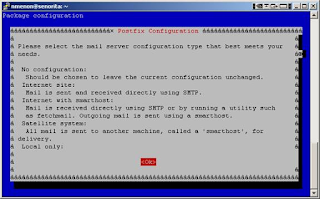
The post is a derivative of the omapzoom wiki page . Disclaimer: my mastery of the wiki tags are dismal.. apologies... some day i hope to have time to post it here Many new developers have been stumped when they need to use git-send-email in corporate environment – usually, if not as a norm, ms exchange servers form the backbone of such an email server system. This page was written based on one of such requirements. To get started, we shall consider common scenarios: a) Setting up a mail forwarding system with postfix on ubuntu b) Setting up a mail forwarding system on a fedora machine c) Using msmtp for using gmail a. to send a patch using a gmail ID b. to send a patch using your corporate ID but through gmail Postfix on Ubuntu – mail forwarding For setting up postfix, you need: a) A mail relay server which will allow your machine to talk to it -> speak to your IT representatives/ other developers sitting next to you b) Super user privileges on the machine you are working on. Step...